Follow-ups and reminders
Every promised callback in one list — overdue in red, today, the next seven days — with reminders on the phone at the right time.
- 1
Open Follow-ups
The Follow-ups tab groups leads by when the callback is due: Overdue, Today and Next 7 days. The count of overdue items is the number to get to zero before anything else.
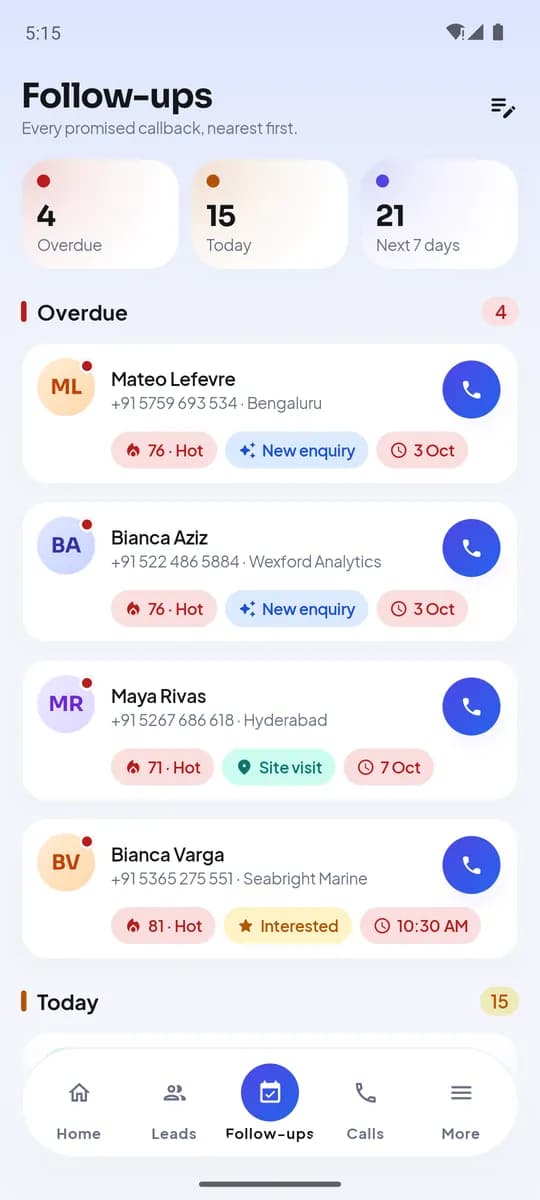
Follow-ups on Android - 2
Where follow-ups come from
Most are set by an outcome’s default. Others are set on the lead — Follow-up row — with a preset or a date-time picker. Managers can set them from the web on any lead they can see.
- Outcome default
- Set on the lead
- Set by a manager on web
- Reminder at the timeon the phone
Three sources, one list - 3
Reminders
The phone reminds you at the follow-up time; tapping the reminder opens the lead with the Call button ready. Reminders are cancelled automatically when the follow-up is done or moved.
- 4
Clear a follow-up
Call the lead and log an outcome — the new outcome sets the next follow-up or clears it. To move a callback without calling, open the lead, tap Follow-up and pick a new time, or choose No follow-up.
- 5
What the manager sees
Overdue and due-today counts per agent are on the live board and in reports, and the Home screen banner on the agent’s phone says the same thing. Nobody has to ask.
Cijfers van vandaagVoorbeeldGesprekken148Bereikpercentage54%Gesprekstijd6h 12mTe late opvolgingen7Follow-up pressure is one of the numbers every dashboard shows
Wat je aan het eind hebt
- A single due list across all sources
- Reminders that open the lead ready to call
- Overdue counts visible to the agent and the manager
Gerelateerd
- ProductHoe het werktDe dagelijkse cyclus, van lead tot opvolging
- ArtikelThe first hour and the next day: how follow-up timing decides which leads you close
- HandleidingSee your follow-ups in Google, Apple or Outlook Calendar
Schrijf naar support — elk bericht wordt binnen één werkdag door een mens beantwoord.
Contact opnemen met support