Start calling from the queue
The queue hands you the next lead — the one most worth calling right now, by its lead score — with the script beside the Call button.
- Leads assigned to you
- Calling hours and attempt limits set by your admin (the app enforces them)
- 1
Open the queue
Tap Start calling on Home. The Calling queue only contains leads in open stages that have attempts remaining, and Auto-dial next lead can move you straight on to the next one.
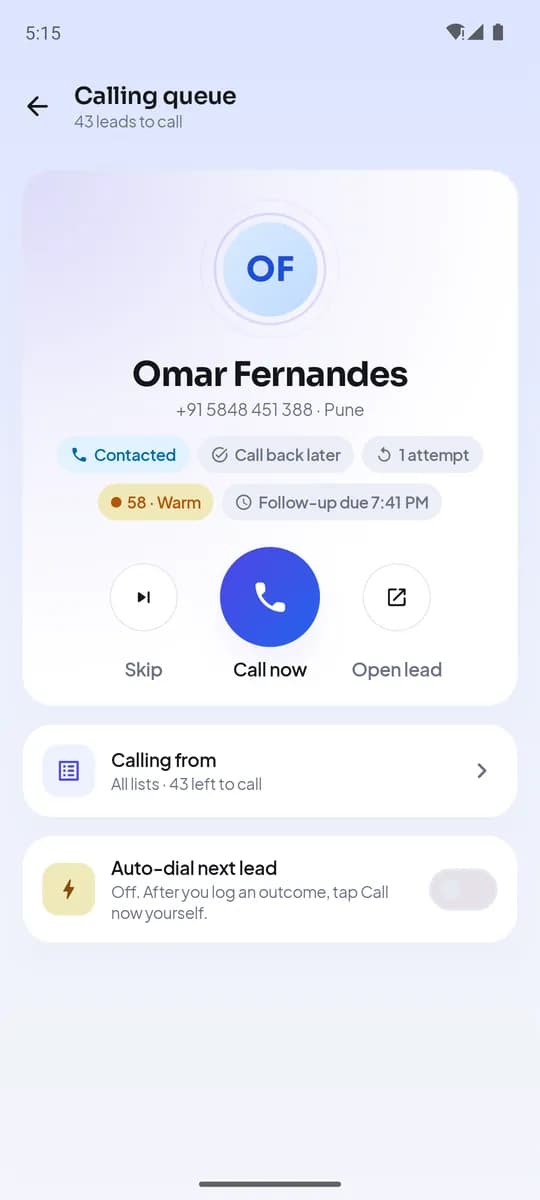
Calling queue - 2
How the next lead is chosen
Every open lead has a score from 0 to 100, and the queue serves the highest first — then the soonest follow-up, then the fewest attempts. Overdue follow-ups and fresh, uncalled enquiries score highest; a run of unanswered calls, or a call in the last two hours, lowers a lead so the same number is not dialled again and again. Skipping a lead moves it to the end for today without changing anything on the record.
- Highest scoreoverdue and fresh leads score high
- Soonest follow-up
- Fewest attempts
Queue order - 3
Read the script, then call
The script that matches the lead’s stage and source appears under the card with the lead’s details filled in. Tap Call now — the call goes out from your own SIM through the phone’s dialer, so the customer sees your normal number.
- 4
When the app stops you
If it is outside calling hours or the lead has reached the attempt limit, the app tells you before dialling. Outside hours you can still call if you choose; at the attempt limit the lead is skipped and flagged for the manager.
Inside calling hours and under the attempt limit?Dials from your SIMCall is captured; outcome prompt followsWarns firstOutside hours: your choice · At the limit: skipped and flaggedPolicy check before every dial - 5
After the call
The moment the call ends, the outcome prompt opens. Pick what happened, adjust the follow-up if the customer named a time, save — and the queue offers the next lead.
Co będziesz mieć na końcu
- A day that starts with the promises at risk
- Every dial checked against hours and attempt limits
- No lead forgotten because it was never in a list
Powiązane
- ProduktJak to działaCodzienny cykl — od leada do follow-upu
- PoradnikLead scores: call the best leads first
- ArtykułThe first week of a new caller: a day-by-day plan that gets them calling on day one
Napisz do wsparcia — na każdą wiadomość odpowiada człowiek w ciągu jednego dnia roboczego.
Skontaktuj się ze wsparciem