

Everything a calling team needs, in the apps they already carry
LumaKol is a CRM built around the phone call: agents call from their own SIM, the app captures what happened, and managers see the whole team without asking for a single report. Every feature below is live today.
- Calling
- One-tap calls from the agent’s own SIM
- Capture
- Every work call logged automatically on Android
- Team
- Live board, attendance and reports
- Languages
- 33 interface languages

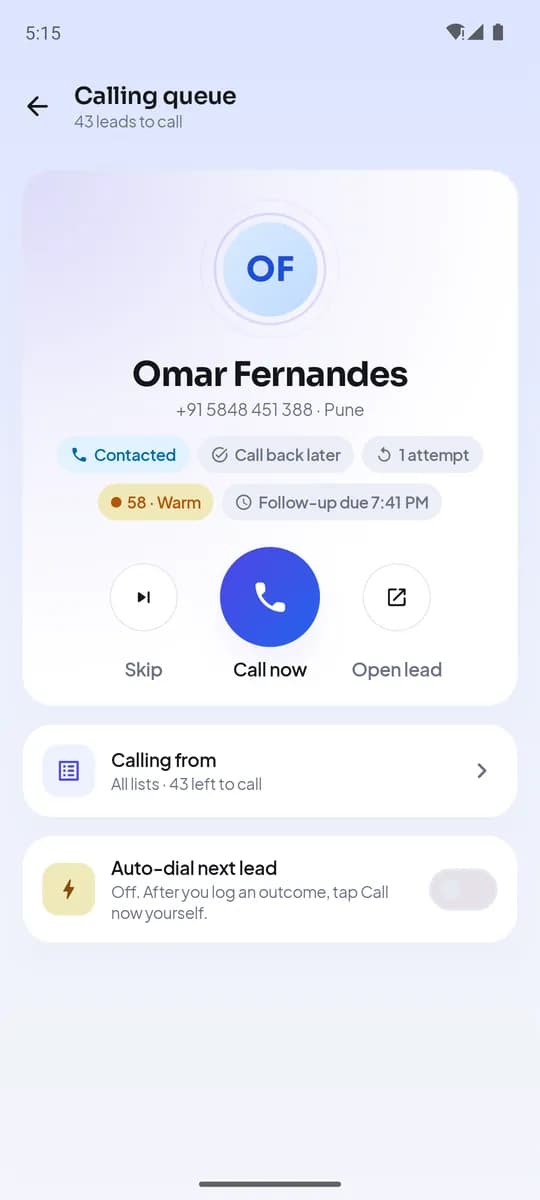
Call from the number your customers already know
The app sits between your agent and the dialer: it places the call on the work SIM, watches for it to end and asks what happened.
- One-tap SIM calling
Call any lead from the queue, the lead card, a follow-up or search — on the SIM the agent chose for work, on any dual-SIM Android phone.
- Automatic call capture on Android
Outgoing, incoming and missed calls to leads are logged with duration and whether they connected. The log catches up on its own after restarts or weak signal; personal calls are never read.
- Caller ID with lead context
When a lead calls back, the agent sees the name, stage and last outcome on screen before picking up, and the outcome form opens as soon as the call ends.
- Assisted calling on iPhone
iOS does not expose the call log, so the iPhone app tracks calls started from a lead, asks for the outcome right after, and shows the lead’s name on incoming calls once Caller ID is enabled. The iPhone app is coming soon to the App Store.
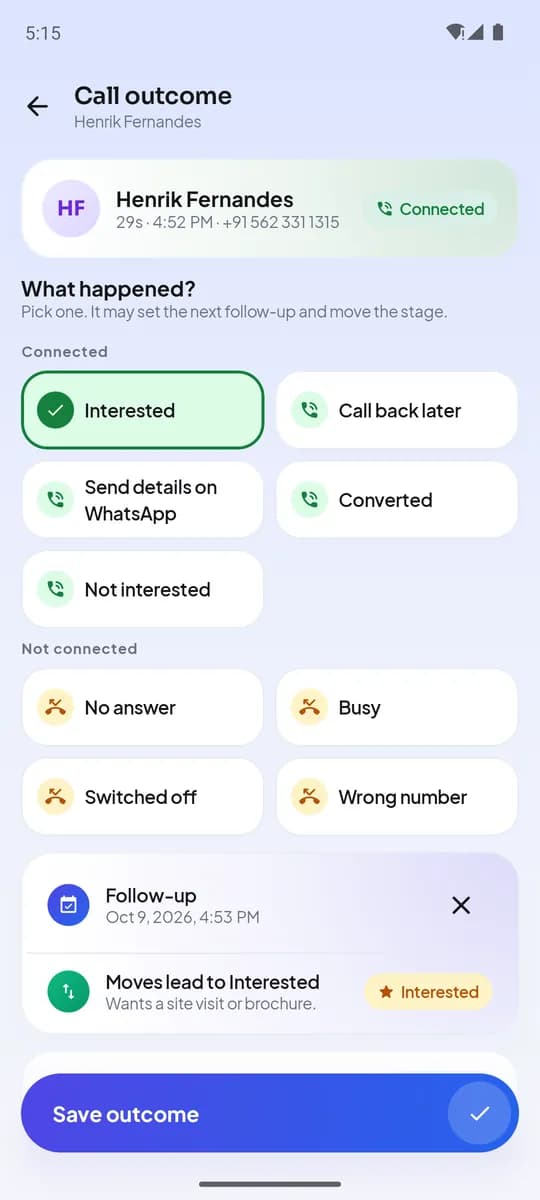
Ten seconds after each call, the lead is already moving
One tap records the outcome, books the next step and keeps the whole history on the lead — no spreadsheets, no evening data entry.
- Outcomes your admin designs
Each outcome can move the stage, schedule the next follow-up and ask questions — choice, rating, number or text. A policy can make the outcome mandatory before the next call.
- Follow-ups and reminders
Quick picks (1 hour, 3 hours, tomorrow 10:00, 3 days, next week) or any date and time. Overdue callbacks jump to the front of the queue and reminders arrive on the phone.
- Call scripts by stage and source
Your admin writes scripts once; the app shows the right one for each lead based on its stage and where it came from.
- WhatsApp, SMS and email templates
Open a ready-to-edit message from the lead with its details filled in. The agent sends it from their own WhatsApp, SMS or email app, and it is recorded on the lead’s timeline.
- Notes and a full timeline
Notes, outcomes, stage changes, assignments and messages line up on one timeline that everyone who can see the lead can read.
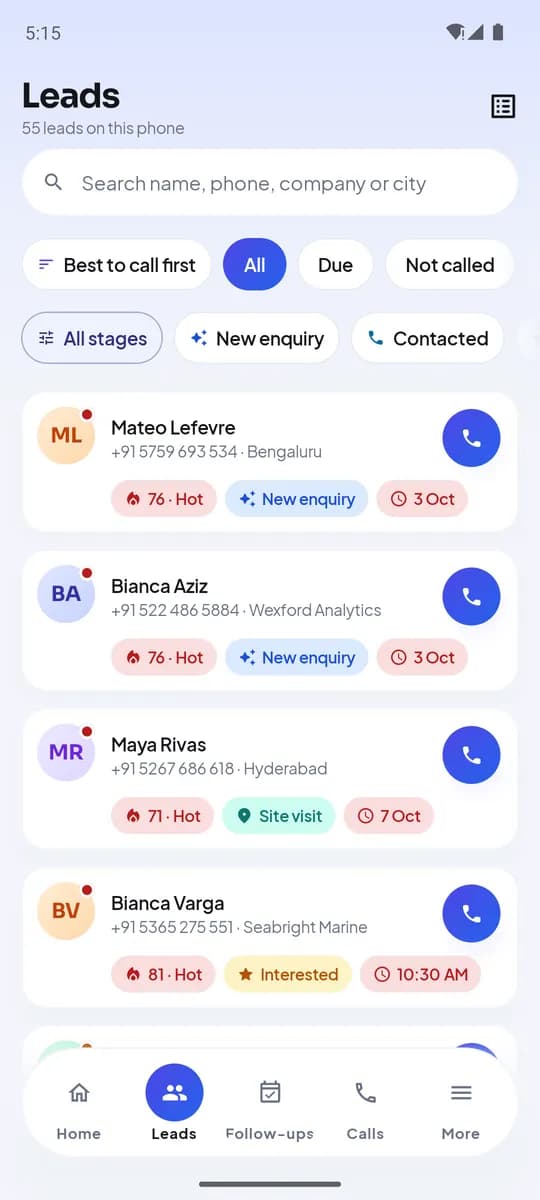
Get every lead in, keep every lead moving
Import from a spreadsheet or connect your lead sources, organise into sheets and stages, assign to the right agent and call the most promising leads first.
- Import from CSV or Excel
Map your columns once, check for duplicates and bad numbers, then assign the import to agents in one go.
- Sheets and stages
Group leads into sheets by campaign or source, move them through the stages you define, and add custom fields for what your business tracks.
- Lead scoring and the queue
Every open lead gets a score from 0 to 100 with the reasons shown. Agents see "Best to call now" and their queue serves the best lead first, with filters for due, not called and open, and instant search.
- Assignment and ownership
Assign leads to agents individually or from an import; each lead has one owner, so two agents never call the same person.
- Export you control
Leads export to CSV with their stage, owner and outcomes — and you choose which roles are allowed to export.
More ways in, and a number to aim for
Website visitors, walk-ins and visiting cards land in the same calling queue, and every caller can see how the month is going.
Website live chat
A chat bubble for your website. Every visitor who writes becomes a lead, and your team replies from the Chats inbox on the web or in the Android app. Up to 10 chat widgets on every plan.
QR posters for walk-ins
Every lead form gets a QR code and a printable A4 poster for your shop counter, office or event stall. Visitors scan it, fill in a short form and land in your calling queue.
Business card scanner
Scan a visiting card with the Android app's camera: name, phone, email and company are filled in for you. Check the fields and save it as a lead.
Sales targets and forecast
Monthly targets per caller for calls, connected calls, deals won or revenue. Callers see their pace on the app's home screen; managers see the team and a month-end revenue forecast.
Leads arrive, get assigned and followed up by themselves
Connect where enquiries come from, decide once what should happen to them, and let LumaKol keep every lead moving while your team calls.
Automatic lead sources
Google Ads lead forms, IndiaMART, JustDial and any website through a webhook. New enquiries become leads automatically, duplicates are caught, and each source assigns, tags and stages its leads. Which sources you can connect depends on your plan.
Missed calls become leads
Optional, on Android: a missed call on the work SIM from a new number becomes a lead with a callback due, owned by the agent whose phone rang. “Not a lead” keeps suppliers and wrong numbers out.
Automation rules
When a lead arrives, is not called in 10 minutes, misses three calls or a follow-up runs late — assign it, move it, tag it, set a follow-up or tell a manager. Every action is shown in the rule history.
Drip sequences
Timed steps after a lead is added: emails sent from your own email account (replies come to your inbox), a WhatsApp or SMS the owner is reminded to send with the text ready, and follow-up tasks. Leads leave when they are won, lost or answer a call.
Lead scoring
A score from 0 to 100 on every open lead, recalculated as calls and follow-ups happen, so the queue and the "Best to call now" list always start with the leads most likely to convert.
Quote, collect and visit without leaving LumaKol
The steps after the call — a price, a payment, a meeting at the customer’s place — are tracked on the same lead.
Quotes on a lead
Items, quantities, GST and a discount, numbered and saved with the lead. Share the link on WhatsApp; you see when the customer opens it, accepts or declines.
Paid by UPI
The quote page has a pay button on phones and a QR code on computers, straight to your own UPI ID. LumaKol never touches the money: mark the quote paid once it arrives and it counts in your revenue report.
Field visits
Check in at the customer with the phone’s location, see how far it is from the lead’s address, add a note, and check out with the outcome.
Day routes
Every visit per person and day, stops in order with distances, and one tap to open the route in Google Maps. Location is read only at check-in, never tracked.
Your leads, wherever they come from
A form on your website, your own software, or a tool you already pay for — every route ends in the same calling queue, and every outcome can go back out the same way.
Google Ads, IndiaMART and JustDial
Connect them once under Lead sources. Enquiries arrive as leads automatically — Google Ads and JustDial as they are submitted, IndiaMART every few minutes — assigned to one person or round-robin, with duplicates caught by phone number. Google Ads, IndiaMART and JustDial need the Growth plan or above.
Lead capture forms
Share a link or paste a snippet into your website. Someone fills it in and the lead is in an agent’s queue seconds later, tagged with where it came from. Built-in spam protection filters out most bot submissions.
Open API
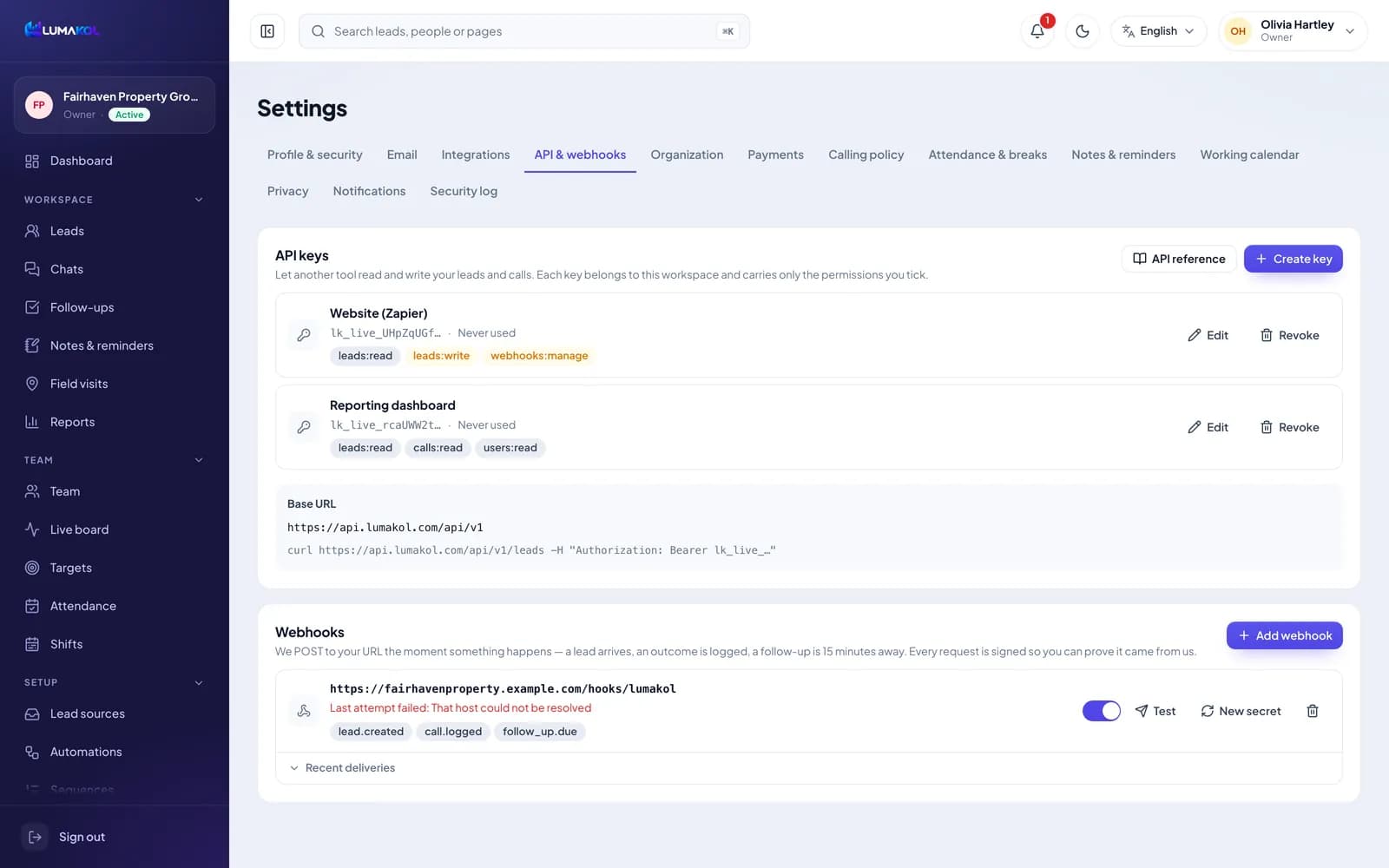
Read and write leads, calls and outcomes from your own software. Keys are created in Settings, carry only the permissions you tick, and can be revoked the moment a tool is retired.
Webhooks
We POST to your URL the moment a lead arrives, an outcome is logged or a follow-up is 15 minutes away. Every request is signed, and a failed delivery is retried 7 times over about 16 hours.
Follow-ups in your calendar
Subscribe once and every promised callback appears in Google Calendar, Apple Calendar or Outlook, with the number and the last outcome on the entry.
See the whole team without asking for a report
Managers get the live picture, the daily numbers and the policies that keep calling compliant — on the web and on their phone.

Live team board
Who is online, on a call or on a break right now, with each agent’s outcomes, overdue callbacks and today’s due list — refreshed every 30 seconds.
Attendance and breaks
Check in and out from the phone, take timed breaks, and optionally require a location or a geofence around the office. Agents can request corrections; managers approve them.
Reports and exports
Calls, connect rate, talk time and outcomes by agent and by day, revenue from quotes, field visits and attendance — with CSV exports for anything you need elsewhere.
Calling policy
Calling hours, an attempt limit per lead, automatic retry intervals and a do-not-call setting that blocks dialing leads who asked not to be contacted apply to every phone, even offline.
Privacy controls
Show, mask or hide phone numbers from agents inside the app, decide who can play recordings, which roles may export, and whether screenshots are blocked in the app.
Recordings for coaching
If an Android phone’s dialer records calls, LumaKol matches the recording to the lead call and uploads it over Wi-Fi so managers can listen and coach.
Coaching analytics
The best hours to call by answer rate, how fast new leads get their first call, follow-ups on time, late or missed, and a scorecard for every caller.
Call review scorecards
Listen to answered calls and score them 1–5 on your own criteria. Callers see the score and your note, and the QA score joins their scorecard.
Built to protect customer data
The same controls on every plan, from the first seat.
Encrypted everywhere
TLS on every connection; the database encrypted at rest, with tokens and other secrets encrypted again with AES-256; passwords hashed with Argon2id and checked against breach lists.
One phone per account
Tokens live in hardware-backed storage, expire every 30 minutes and rotate silently; signing in on a second phone signs the first one out.
Ticketed support access
LumaKol staff can only enter your workspace through a ticketed, time-limited session that is read-only by default and recorded.
Admin, reporting and billing in the browser
Agents live in the app; owners, admins and team leads run the workspace from the web.
- DashboardToday’s calls, connect rate, overdue follow-ups and each agent’s numbers at a glance.
- Leads, sheets and importsThe full lead table with filters, bulk assignment, imports and exports.
- ReportsAgent, team and day views with exports; attendance by day.
- SettingsStages, outcomes and questions, scripts, templates, calling policy, privacy, working calendar and roles.
- BillingPer-seat plans with GST invoices in India and USD elsewhere, paid by card, UPI or net banking.
- Your language, your time zoneEach person picks their own language and time zone; reminders and reports follow them.
An app that captures every work call
LumaKol runs on the phone your agents already have. On Android it captures every work call in the background; on iPhone it tracks calls started from the app. No extra hardware, no new number, no training day.
- Works on the phone and SIM your agents already have
- On Android, every lead call on the work SIM is captured, even when the app is not open
- Guided setup in minutes, with no IT involvement
- Lead details on screen before the agent picks up
SIM-based CRM vs VoIP dialers vs spreadsheets
Cloud telephony charges per minute and calls from unknown virtual numbers. Spreadsheets and WhatsApp groups lose the follow-up. LumaKol sits on the phone your agents already use.
| What you get | LumaKol | VoIP / cloud dialers | Spreadsheets & WhatsApp |
|---|---|---|---|
| Calls show your agent’s real mobile number | Yes | Virtual or masked number | Yes |
| Per-minute calling charges | None — uses the SIM plan | Billed per minute | None |
| Risk of being flagged as spam by carriers and caller-ID apps | Low — known personal numbers | High for shared virtual numbers | Low |
| Lead calls logged automatically, including missed and incoming | On Android, yes — even after restarts. On iPhone, calls started from the app | Only calls made inside the dialer | Manual entry |
| Feedback captured the moment a call ends | One-tap outcome and notes | Sometimes | Rarely |
| Follow-up reminders and callbacks | Yes, in the agent’s time zone | Depends on the CRM | Forgotten |
| Call recording | On Android, syncs the recordings your phone’s dialer already makes | Server-side | No |
| Calling hours, attempt caps and do-not-call policy | Built in, for your own do-not-call list (no national registry screening) | Varies | No |
| Live team board for managers | Yes | Yes | No |
| Works when mobile data is weak | Calls unaffected; data syncs later | Call quality drops | Yes |
Comparison reflects typical cloud-dialer and manual workflows; specific products differ.
A dedicated view for every role
Owner
Billing, plan and seats, security settings — plus everything an admin can do.
Admin
Teams, agents, lead sources, outcomes, automations and reports.
Team lead
Live board, coaching analytics, call reviews and follow-up discipline for their team.
Agent
A queue ordered by lead score, one-tap dial, post-call outcomes, follow-ups and field visits.
Give your team a CRM that captures every call
Set up your workspace in minutes and start capturing calls today.
Create free account