Follow-ups and reminders
Every promised callback in one list — overdue in red, today, the next seven days — with reminders on the phone at the right time.
- 1
Open Follow-ups
The Follow-ups tab groups leads by when the callback is due: Overdue, Today and Next 7 days. The count of overdue items is the number to get to zero before anything else.
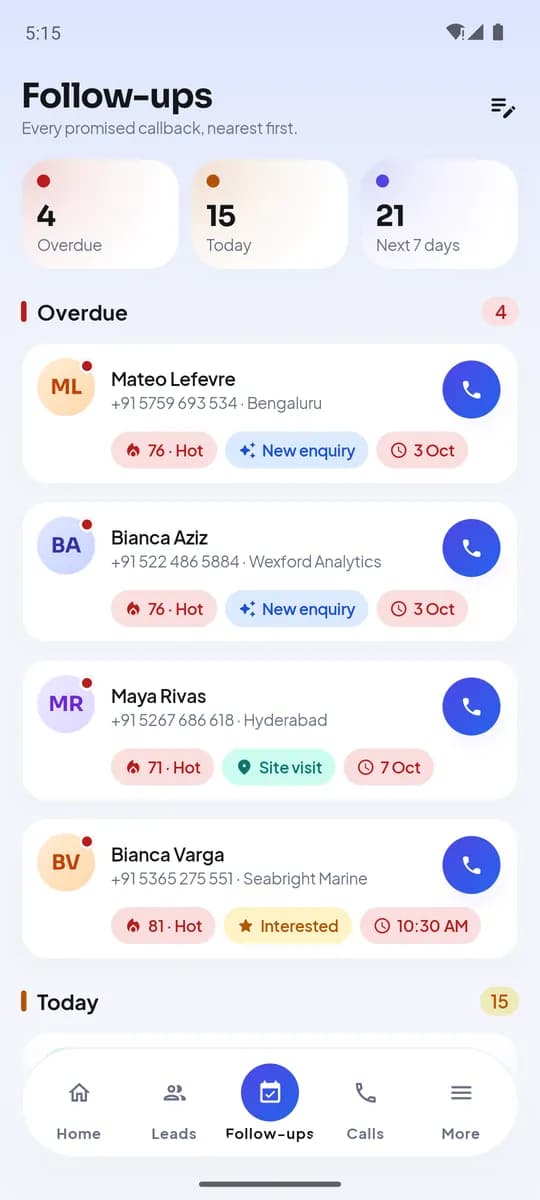
Follow-ups on Android - 2
Where follow-ups come from
Most are set by an outcome’s default. Others are set on the lead — Follow-up row — with a preset or a date-time picker. Managers can set them from the web on any lead they can see.
- Outcome default
- Set on the lead
- Set by a manager on web
- Reminder at the timeon the phone
Three sources, one list - 3
Reminders
The phone reminds you at the follow-up time; tapping the reminder opens the lead with the Call button ready. Reminders are cancelled automatically when the follow-up is done or moved.
- 4
Clear a follow-up
Call the lead and log an outcome — the new outcome sets the next follow-up or clears it. To move a callback without calling, open the lead, tap Follow-up and pick a new time, or choose No follow-up.
- 5
What the manager sees
Overdue and due-today counts per agent are on the live board and in reports, and the Home screen banner on the agent’s phone says the same thing. Nobody has to ask.
ตัวเลขวันนี้ตัวอย่างสาย148อัตราการติดสาย54%เวลาสนทนา6h 12mการติดตามที่เลยกำหนด7Follow-up pressure is one of the numbers every dashboard shows
สิ่งที่คุณจะได้เมื่อจบ
- A single due list across all sources
- Reminders that open the lead ready to call
- Overdue counts visible to the agent and the manager
ที่เกี่ยวข้อง
- ผลิตภัณฑ์วิธีการทำงานวงจรประจำวัน ตั้งแต่ลีดจนถึงการติดตามผล
- บทความThe first hour and the next day: how follow-up timing decides which leads you close
- คู่มือSee your follow-ups in Google, Apple or Outlook Calendar
เขียนถึงฝ่ายสนับสนุน ทุกข้อความได้รับคำตอบจากเจ้าหน้าที่จริงภายในหนึ่งวันทำการ
ติดต่อฝ่ายสนับสนุน