Connect your own software with the API and webhooks
A key your tool uses to read and write leads and calls, and webhooks that push events to your own endpoint the moment they happen. Both live in Settings → API & webhooks.
- Owner or admin access to Settings
- Someone who can write a little code, or a tool that accepts an API key
- For webhooks: an https address of your own that the internet can reach
- 1
Create a key with only the permissions that tool needs
Settings → API & webhooks → Create key. Name it after the tool rather than the person — that name is what you will see in this list and in the security log months from now. Then tick the permissions, and only those: a key that can only read cannot be made to write anything.
- leads:read — read leads, stages and outcomes
- leads:write — create, update and delete leads, add notes
- calls:read — read the call history
- users:read — read the people in this workspace
- webhooks:manage — create and delete webhooks
टीप: A dashboard that only displays numbers needs leads:read and nothing else. Add a write permission on the day something actually writes. You can also give a key an expiry date and a list of the IP addresses it may be used from, and change both later without changing the key.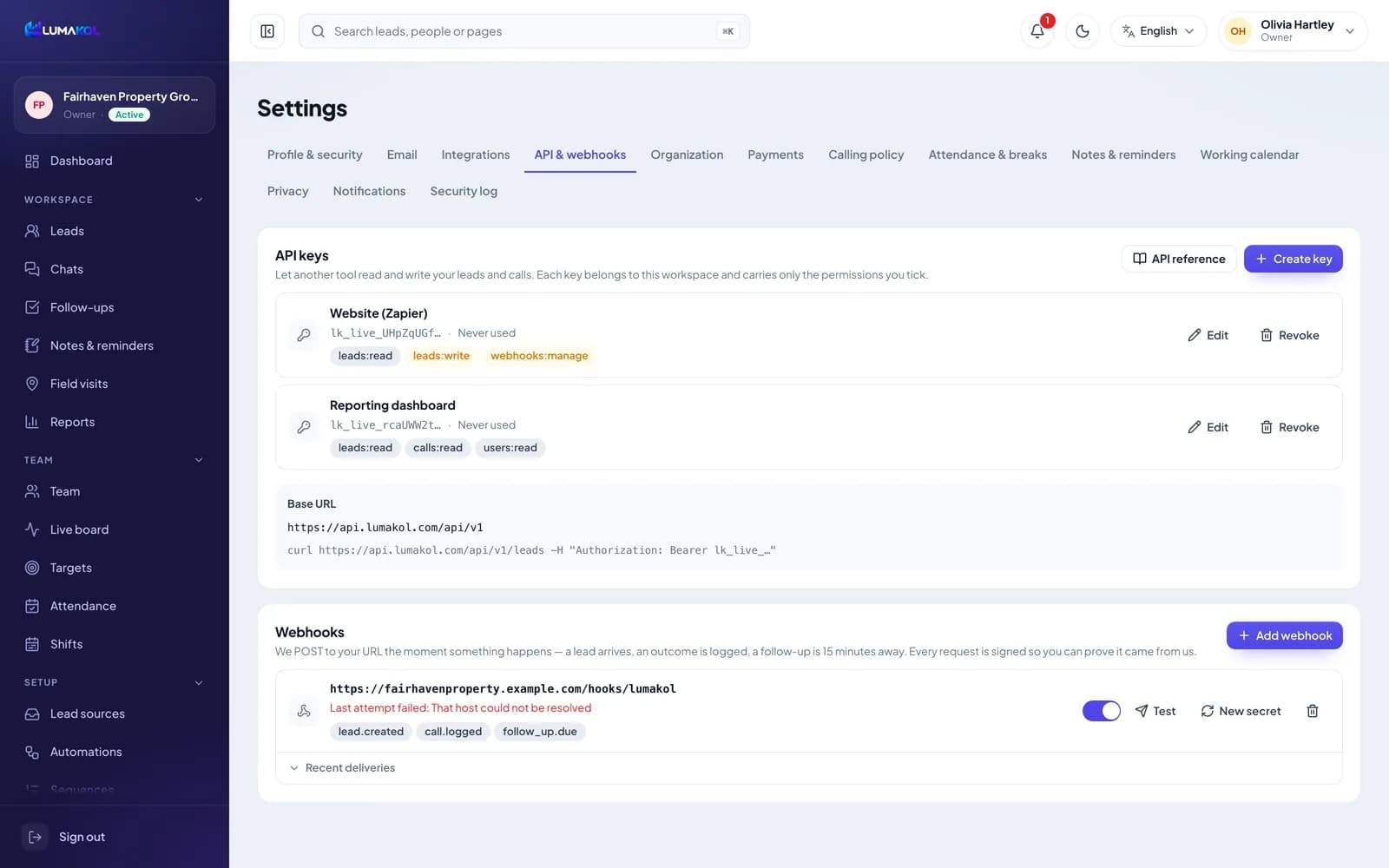
- 2
Copy it now — it is shown once
The key starts with lk_live_ and appears exactly once, in the dialog straight after you create it. Only a hash of it is stored, so nobody can read it back afterwards; the list shows the first few characters so you can tell your keys apart. Lose it and the fix is to revoke that key and issue a new one. A key belongs to the workspace rather than to one agent — an integration that saw only part of your leads would sync half your data and look broken — and everything it writes is attributed to it in the security log.
- 3
Base URL and the first call
Settings → API & webhooks shows your base URL — today https://api.lumakol.com/api/v1 — and the key goes on every request as a bearer token. GET /ping is the call to make first: it answers with the workspace the key belongs to and the permissions it carries, which proves the key, the header and the address are all right before you write any real code. Every endpoint, field and error code is listed in the API reference: Settings → API & webhooks → API reference (you need to be signed in).
- curl https://api.lumakol.com/api/v1/ping -H "Authorization: Bearer lk_live_…"
- 4
Read your leads
GET /leads returns a page of leads and the filters you would expect: stage, owner, source, tag, q for a text search, and limit up to 200 at a time. The answer is an object, not a bare list — the leads are in data, with next_cursor and has_more beside them.
- curl "https://api.lumakol.com/api/v1/leads?limit=100" -H "Authorization: Bearer lk_live_…"
- GET /leads/find looks one lead up by phone, email or the external_id you set yourself
- GET /stages and GET /dispositions give you the ids behind your own pipeline and outcome lists
- 5
Paging, and keeping a copy in step
Pass a page’s next_cursor back as cursor and repeat until has_more is false; the cursor is stable, so leads that change while you are paging cannot make you skip a row. For an ongoing sync, remember when you last ran and send that as updated_since on the next run — you get only what changed since, and you page through that the same way. Each key may make 60 requests a minute, a workspace 120 a minute across its keys and 10,000 a day. API keys are available on paid plans, not during the free trial. Responses carry RateLimit-Limit, RateLimit-Remaining and RateLimit-Reset headers, and a 429 comes with Retry-After; when Remaining reaches zero, wait for the reset instead of retrying in a loop.
टीप: updated_since plus cursor is the whole sync: one full pass the first time, a handful of rows every run after that. - 6
Add a webhook
Settings → API & webhooks → Add webhook. The URL must be https and reachable from the internet — a private or internal address is refused when you save it and checked again before every delivery, so repointing the DNS later does not get past it. Tick the events you want, then use Test to queue a sample delivery and prove your receiver works before you rely on it. Deliveries are sent from a queue checked every ten seconds, so expect them within seconds rather than instantly.
- lead.created — a lead is added by hand, through the API, a form, a lead source, the website chat or a missed call (not by a file import)
- lead.updated — a lead is edited, in the app, through the API or by an automation rule (logging a call outcome sends call.logged instead)
- lead.stage_changed — a lead moves to another pipeline stage
- lead.assigned — a lead is given to someone, or taken away
- call.logged — an outcome is logged against a call
- follow_up.due — a lead with an owner has a follow-up due within 15 minutes
- Something happensa lead arrives, an outcome is logged
- Written downqueued before we try to send
- Signed POSTJSON over https
- Your endpoint answersany 2xx and it is done
One delivery. The event is recorded first, so a restart cannot lose it - 7
Verify the signature
Every request carries four headers: X-LumaKol-Event, X-LumaKol-Delivery, X-LumaKol-Timestamp and X-LumaKol-Signature. The signature is sha256= followed by an HMAC-SHA256 of the timestamp, a full stop, and the raw body, keyed with the signing secret shown when you created the webhook — it starts with whsec_. Recompute it over the bytes you actually received rather than your re-serialised JSON, compare the two with a constant-time comparison, and reject anything whose timestamp is not recent. A request that does not match did not come from us.
- The string that is signed is the timestamp, a full stop, then the body — in that order
- X-LumaKol-Delivery is stable across retries: store it and ignore a repeat, because a delivery that timed out on our side is retried even if your server finished it
- “New secret” rotates the key and the old one stops working at once, so update your receiver first
- 8
The delivery log and the retries
Open “Recent deliveries” under a webhook to see the last deliveries with the event, whether they went through, the status code your server returned or the error we hit, and when. Anything that is not a 2xx — a redirect counts as a failure — is retried after five minutes, fifteen minutes, an hour, three hours, six hours and six hours again: seven attempts over about sixteen hours, so a receiver that is down for a while loses nothing and one that is down all day is eventually given up on. Only the status code or error is kept, not your response body. The webhook keeps showing its last failure until it succeeds or you switch it off and on.
- The switch pauses a webhook without deleting it, which is what you want while you redeploy
- Delivery rows are a debugging aid, not a record — they are cleared after about two weeks
- Deleting a webhook drops whatever is still queued for it
- 9
Revoke a key when it is done with
Revoke stops everything using that key immediately, and it cannot be undone — there is no pause, by design. Revoke when a tool is retired, when the person who set it up leaves, or the moment you suspect a key has leaked, then issue a new one and paste it into the tool. The list shows when each key was last used, which is the quickest way to spot one that nothing needs any more.
शेवटी तुमच्याकडे काय असेल
- A key per tool, carrying only the permissions that tool needs
- A sync that reads only what changed since it last ran
- Signed events arriving at your own endpoint, with a log for the ones that do not
सामान्य प्रश्न
Can a key be limited to one agent’s leads?+
No. Keys are workspace-wide on purpose — an integration that could see only part of the data would sync half your leads and look broken. Limit what a key can do with its permissions instead.
What happens if my endpoint is slow?+
We wait about ten seconds for an answer and then treat it as a failure and retry. Answer with a 2xx as soon as you have the payload and do your own work afterwards.
Do I need an API key to use webhooks?+
No. You add webhooks in Settings yourself. The webhooks:manage permission is only for a tool that needs to subscribe on your behalf.
Is there a test workspace?+
There is no separate sandbox. Use Test on a webhook — it sends a sample payload marked as a test — and a read-only key against your real workspace, which cannot change anything.
संबंधित
- उत्पादनवैशिष्ट्येLumaKol काय करते ते सर्व, स्क्रीननुसार
- लेखतुम्ही आधीच वापरत असलेल्या सॉफ्टवेअरशी LumaKol जोडणे
- मार्गदर्शकConnect Google Ads, IndiaMART, JustDial and your website as lead sources
सपोर्टला लिहा — प्रत्येक संदेशाला एका कामकाजाच्या दिवसात एक व्यक्ती उत्तर देते.
सपोर्टशी संपर्क साधा