Call scripts and WhatsApp / SMS / email templates
Admins write scripts and templates once; agents see the right script beside the Call button and send a filled-in message in one tap, logged on the lead.
- 1
Write scripts for stages and sources
Setup → Call scripts. A general script applies everywhere; a script for a stage or a lead source overrides it. Use Insert variable to add the lead’s details — {{first_name}}, {{company}}, {{agent}}, {{org}} or any custom field — and they are filled from the lead when the agent reads it.
- 2
Create message templates
Setup → Message templates. Each template has a channel (WhatsApp, SMS or email), a category such as Introduction or Brochure, and a body with the same variables. Keep the library small: Tried calling, Details as discussed, Visit confirmation, Reminder.
lumakol.com/app/app/templatesٹیمپلیٹ شامل کریںپیغام ٹیمپلیٹسواٹس ایپ، SMS اور ای میل کے لیے تیار متن جن میں لیڈ کی تفصیلات خودکار بھر جاتی ہیں (TPL-01)۔واٹس ایپ زمرہ Tried calling واٹس ایپ Introduction Details as discussed واٹس ایپ Brochure Visit confirmation SMS Follow-up ویری ایبلز: {first_name} {agent} {org} {product} - 3
The agent sees the script on the lead
On the queue card and on the lead, the script that matches the lead’s stage and source is shown with the values filled in, so the opening line is ready before the dial.
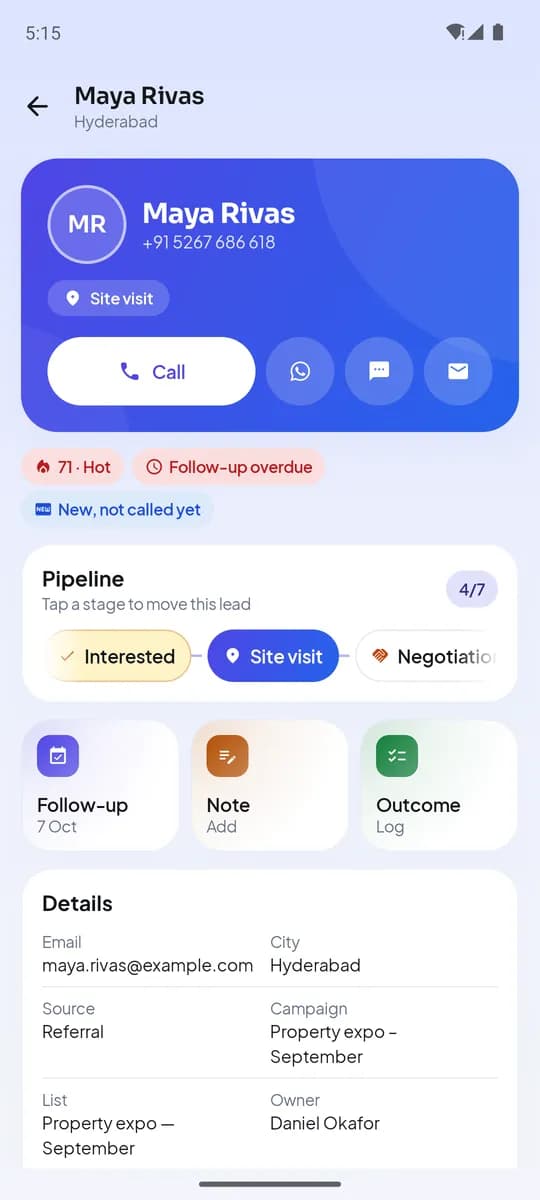
Lead detail on Android: Call, WhatsApp, SMS - 4
Send a message in one tap
On the lead, tap WhatsApp, SMS or email. Pick a template, edit the text if needed and tap Open in WhatsApp (or Messages, or Mail). The send happens in that app from the agent’s own number; LumaKol logs “WhatsApp sent · Details as discussed” on the timeline.
- Pick template
- Edit if needed
- Open in WhatsApp / SMS / Mailfrom the agent’s number
- Logged on the lead
Templates keep messages consistent and on the record
آخر میں آپ کے پاس کیا ہوگا
- Scripts that match stage and source, filled in per lead
- A template library agents use daily
- Every message logged on the timeline
متعلقہ
- پروڈکٹخصوصیاتLumaKol جو کچھ کرتا ہے، ہر اسکرین کے ساتھ
- مضمونCall scripts that do not sound scripted (and the templates that follow them)
- مضمونWhatsApp plus calls: the two-channel follow-up playbook, with templates you can copy
سپورٹ کو لکھیں — ہر پیغام کا جواب ایک کاروباری دن کے اندر ایک انسان دیتا ہے۔
سپورٹ سے رابطہ کریں